The precise build
Record the Acorn version, application, parser and any separate dependencies. A result belongs to the combination that was tested.
 Designed in the UK
Technical guide
File-system access, imaging and artefact interpretation are different capabilities. This guide separates them so you can ask the right questions.
SQFR’s release requirement is tested write-blocking capability supported by a published validation white paper. The Acorn will not ship before that requirement is met. The release paper will describe the tested build, devices, method and results.
Documented means described in the reviewed build material. Example tested means demonstrated on the stated sample, not every variant. Setup only means the interface is shown but completion is not established. − * marks work recorded as under development. Not verified is not a promise that support is planned.
Reviewed September 2026. The professional release target is late Q4 2026. This is not a complete compatibility certificate: confirm the exact build, input variant and required output.
38 entries
| Input or capability | Status | Scope and limits | Where to look |
|---|---|---|---|
| NTFS | Example-tested | Read and analyse: the browser-evidence pipeline returned six planted records from a synthetic NTFS image, with additional public-corpus results. Separate MFT and USN examples demonstrate record review. This is not a guarantee of complete deleted-file recovery or support for every NTFS condition. | Browsing History; MFT Viewer; USN Journal Viewer |
| FAT16 | Example-tested | Read and recover: a constructed disk image with a missing partition table yielded a FAT16 volume and readable files. A separate quick-format example recovered four PDFs through their EOF markers, without their final newline. It does not demonstrate recovery after overwriting or secure erasure. | Partition Recovery; Recovery Carver |
| FAT32 and exFAT | Example-tested | Read and analyse: six planted browser records were extracted from each synthetic filesystem image. The tested route includes a bounded search for copied browser stores. These tests do not qualify every filesystem feature, damaged volume or recovery operation. | Browsing History |
| ext4 | Example-tested | Read and analyse: a synthetic browser-store image returned the expected six rows. A separate 10 MiB carving check recovered five allocated, contiguous ELF file locations byte-exact. That small test does not establish fragmented-file or deleted-file recovery across ext4 volumes. | Browsing History; Recovery Carver |
| XFS | Example-tested | Read and analyse: the documented browser pipeline used its XFS-reader route to recover six planted browser records. Support demonstrated here is targeted browser extraction, not a blanket claim for all parsers in The Acorn, filesystem repair or deleted-file recovery. | Browsing History |
| Btrfs | Example-tested | Read and analyse: the unpartitioned synthetic image returned six browser records through a no-mount extraction route. Btrfs within a partition table needs the separately documented mounted-folder route; it was not covered by that passing synthetic test. | Browsing History; Mount Image |
| APFS | Example-tested | Read and analyse: the documented browser pipeline returned 1,259 rows from a public macOS image using its APFS reader. FileVault-locked volumes remained locked in this validation. This is neither universal APFS decryption nor proof that every application in The Acorn can read the same source. | Browsing History |
| HFS+ | Example-tested | Read and analyse: a documented public-image check returned 573 browser records from an HFS+ source. Confirm the actual image, encryption state and intended examination route. This does not extend automatically to every HFS/HFSX variant or Time Machine layout. | Browsing History |
| ReFS, F2FS and UFS | Not verified | Read and analyse: the reviewed coverage record identifies no wired reader for these filesystems. Do not treat signature recognition, device imaging or an installed utility as evidence of usable record extraction. Discuss a specific source before relying on this route. | Workflow assessment |
| Input or capability | Status | Scope and limits | Where to look |
|---|---|---|---|
| RAW disk images and split RAW | Example-tested | Read and analyse: the browser pipeline passed RAW and split-RAW fixtures. Acquire: a separate 33 MiB file-to-file recovery-copy example completed with matching hashes and no read errors. It was not a failing physical drive, and does not validate every hardware acquisition route. | Browsing History; Forensic Imager; Live Disk Map |
| E01 evidence images | Example-tested | Read and analyse: a synthetic E01 image returned the expected browser records. Acquire: the Imager documents E01 controls, compression and segmentation, but the selected screenshot is setup rather than a completed job. Confirm the intended writer and receiving tool for your acquisition. | Browsing History; Forensic Imager |
| VMDK, VHD and VHDX virtual disks | Example-tested | Read and analyse: the browser pipeline extracted the planted NTFS records from each tested virtual-disk container. These results do not prove that every snapshot chain, encrypted disk or guest operating system will open or boot. Acquisition into a virtual disk is a separate question. | Browsing History; Mount Image |
| QCOW2 virtual disks | Example-tested | Read and analyse: the tested route exposed the QCOW2 contents as a read-only RAW view and extracted six browser records. This is container access, not a successful virtual boot. Backing files, damaged chains and encryption require a separate assessment. | Browsing History; Mount Image |
| AFF classic | Documented workflow | Read: AFF classic is identified as supported in the current coverage notes, but no AFF fixture result is supplied in that matrix. Confirm the particular file and output route. AFF classic and AFF4 are different support claims. | Image access workflow |
| DMG, legacy Apple and backup access | Documented workflow | Read: the product policy documents DMG payload exposure and Apple backup inspection routes. A listed package or hook is not a passing examination result. Confirm compression, encryption, container revision and the intended reader against a representative sample. | Mount Image; Forensic Imager |
| AFF4, AD1 and XWFS2 | Not verified | Read and analyse: the reviewed records do not support advertising these containers as qualified. AFF4 had no installed reader in the coverage check; AD1 lacked a validated parser; XWFS2 is not advertised as supported. An accepted extension or a RAW carving route does not resolve this gap. | Workflow assessment |
| Ex01, L01 and other container variants | Not verified | Read or acquire: an older capability guide describes partial routes, but the reviewed end-to-end matrix does not qualify these variants. Request a sample-based check of the exact format, compression, encryption and intended output rather than assuming E01 results apply. | Forensic Imager; image access workflow |
| Input or capability | Status | Scope and limits | Where to look |
|---|---|---|---|
| Windows event logs and encoded PowerShell | Example-tested | Analyse: public EVTX training data produced searchable records, rule matches and a decoded command fragment. Decoding is not execution, and several rules may refer to one event. The examiner must check the underlying event and wider activity before drawing a conclusion. | Event Log Viewer; Text Lab |
| Windows Registry hives | Example-tested | Analyse: public training hives show system settings, registered programs and available application-path information. A registration is not proof of execution. Transaction replay, corrupt hives and full-version coverage must be checked separately from these demonstrated records. | Registry Analyser |
| MFT and USN Journal records | Example-tested | Analyse: public examples show timestamp comparisons, file references and a rename sequence. These records can connect names and activity, but do not alone establish a document's content, its author or the person at the keyboard. They are separate from general NTFS recovery. | MFT Viewer; USN Journal Viewer |
| Prefetch and Windows shortcuts | Example-tested | Analyse: three unmodified public Prefetch fixtures produced native parser output; separate LNK examples expose target paths and embedded timestamps. File-copy timestamps and timestamps stored within a shortcut must be distinguished. A shortcut alone is not proof of execution. | Forensic Browser; Shortcut Viewer |
| SRUM application network use | Example-tested | Analyse: a public SRUM example contains application network counters, imported after date-field normalisation. The source-clock time zone is unknown. A sent-byte total does not identify transferred files, a destination or an exfiltration event. | SRUM Viewer |
| Browser history and SQLite databases | Example-tested | Analyse: public Chrome records demonstrate download review and read-only SQL grouping of cloud-related page visits. Artefact Lens separately documents companion discovery and controlled SQLite snapshots. A table query does not provide every application's meaning, recover every deleted row or prove an upload. | Browsing History; Database Explorer; Artefact Lens |
| Property lists and Scheduled Task XML | Example-tested | Analyse: constructed LaunchAgent plists and Scheduled Task XML files were parsed into reviewable keys and records. The examples were inert and no described task or script ran. Configuration alone does not show successful execution or malicious intent. | Plist Viewer; Artifact Lab |
| Microsoft 365 audit exports | Example-tested | Analyse: 31 constructed AuditData JSON events produced native sign-in, download and forwarding-rule findings. These were offline training records, not a live tenant collection. Rule matches do not independently prove account compromise or data loss. | Unified Log Analyser |
| PCAP network captures | Example-tested | Analyse: an unmodified public capture was summarised into conversations and endpoints; a separate constructed capture demonstrated object and string review. Encryption, missing packets and capture position limit what can be established. These examples did not perform live interception. | Network Workbench; PCAP Analyser; Net Sentinel |
| Office documents and static file triage | Example-tested | Analyse: an invented DOCX invoice exposed its package structure and external hyperlink, while an inert text fixture produced static rule findings. The content was not executed. A rule match or suspicious structure is a lead, not a conclusive malware verdict. | Document Threat Lab; Malware Triage |
| EXIF coordinates and call-detail records | Example-tested | Analyse: constructed JPEGs yielded four GPS points, and a separate invented 12-record CDR set produced a timeline and map. These are metadata and tabular examples, not measured tower coverage or proof of an individual's location or journey. | GeoExif Mapper; Cell Site Analyser |
| Audio measurements and review outputs | Example-tested | Analyse: a generated ten-second WAV produced metadata, hashes, a waveform, a spectrogram and silence measurements. This is a bounded audio example, not qualification of every codec, proprietary CCTV container or authenticity conclusion. | AV Analyser |
| Raw memory and authorised Android acquisition | Not verified | The reviewed Memory Workbench and Android Collector screens are configuration/reference views. No memory plugins ran and no handset was acquired in those captures. They show intended routes, not verified support for your OS build, device, volatile structures or collection scope. | Memory Workbench; Android Collector |
| Comprehensive native iOS parsing | − * In development | The reviewed product material describes native comprehensive iOS parsing as not yet released. Apple Mobile Lab's reference screen does not establish an extraction or parsing result; the current format policy does not advertise separately packaged additional mobile parsers as installed capabilities. | Apple Mobile Lab |
| Additional direct cloud connectors | − * In development | The collector's profile screen distinguishes a provider-export import route from planned connectors. The screenshot did not run a collection. Treat direct provider access as a separate, provider-specific capability to confirm, not a universal cloud or remote acquisition promise. | Cloud & Remote Collector |
| Input or capability | Status | Scope and limits | Where to look |
|---|---|---|---|
| Artefact Lens recognition and Workbench hand-off | Documented workflow | A right-click can open Artefact Lens to explain a recognised selection, its supporting clues, companion files and an appropriate adapter. The Acorn Files provides a view-only entry point; parsing that creates case outputs is handed to Workbench. Recognition is not a completed parser result. | Artefact Lens; Forensic Workbench; The Acorn Forensic Actions |
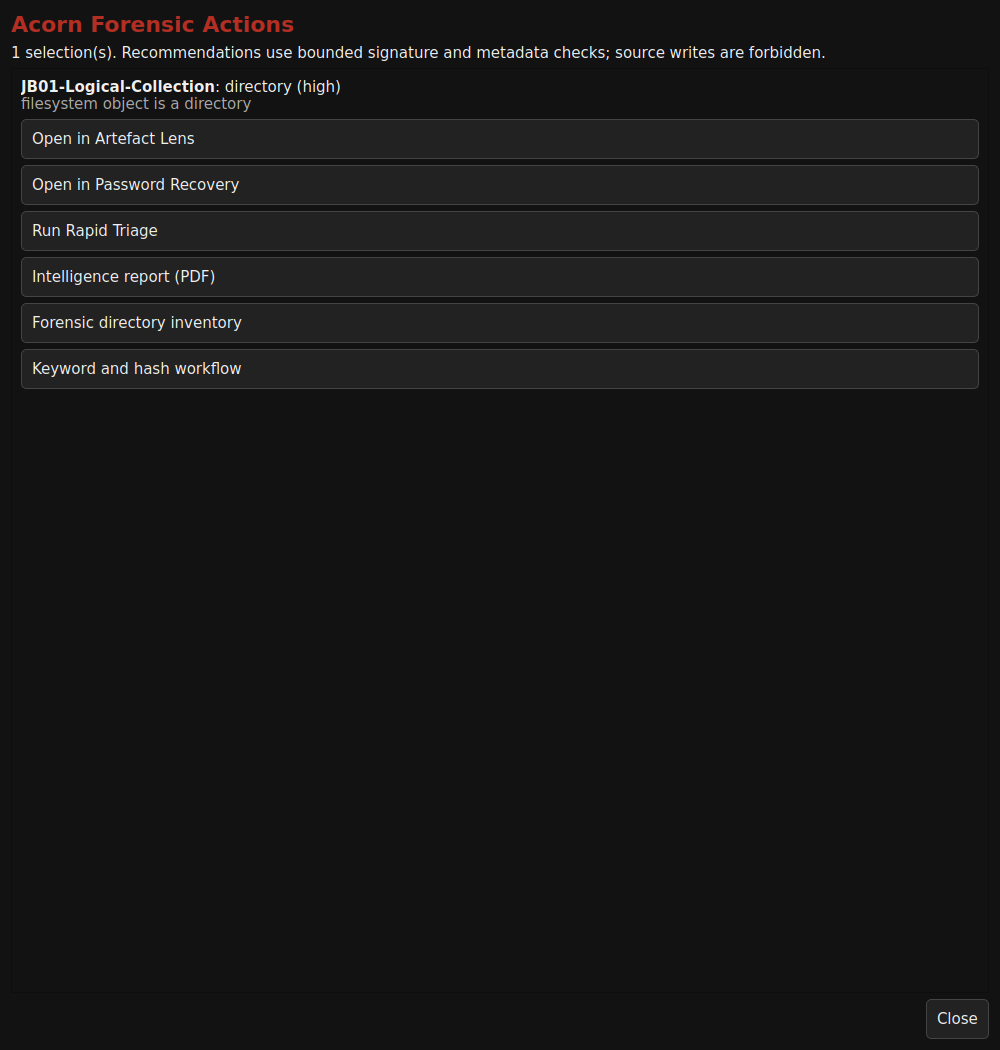
| Contextual folder and device reports | Documented workflow | Native menus offer directory inventory, selected hashes, triage and an intelligence-report route. The reviewed menu captures show available actions only. The intelligence report is a separate action alongside Artefact Lens, not proof that opening Lens automatically generates a report. | The Acorn Forensic Actions; Device Manager |
| Per-artefact tables and combined report views | Example-tested | The archived teaching example shows a combined report for six Prefetch files and three event logs, with per-item report links and processing states. Treat it as an example of that workflow, not proof that every recognised family exports the same tables or report formats. | Forensic Browser; contextual reporting |
| Native PDF reports and recorded method | Example-tested | The pack contains native Malware Triage, Net Sentinel and Case Notes PDFs from documented public or constructed inputs. Case Notes records source references and the examiner's review. A report seal or file hash protects an output's identity; it does not independently certify the conclusions. | Case Notes; Malware Triage; Net Sentinel |
| CSV, TSV and structured recovery records | Example-tested | Recorded examples include native CSV filters, recovery TSV/CSV tables and JSON Lines recovery records. Available fields and exports vary by application. The illustrated recovery-verification PDF was assembled separately from native results and must not be advertised as a native The Acorn PDF export. | Text Lab; Recovery Carver |
| Universal export and specialist reconstruction | Not verified | No universal every-app/every-format export contract is established. Artefact Lens also lists deleted SQLite recovery, dirty ESE repair, registry transaction replay and filesystem-journal reconstruction as separate qualification work. Do not convert those gaps into claims of automatic recovery or complete coverage. | Workflow assessment |
* Under development: scope and delivery timing may change. Imaging a readable block device does not mean The Acorn can decrypt its contents or parse every file system on it.
Validation and a practical pilot
An app screenshot shows an interface. A useful evaluation also identifies the input, settings, expected result and what actually happened. Use these checks to decide whether a particular workflow fits your work.
Record the Acorn version, application, parser and any separate dependencies. A result belongs to the combination that was tested.
Use a permitted dataset with known records or an independently checked reference. Keep its identity, hash and expected result.
Record the steps, observed output and gaps. Repeat the test and investigate differences before extending the claim to new inputs.
Plan a demonstration, compare a second method and record what another examiner needs to reproduce the work. The checklist is ungated and works offline.
Software read-only controls are not a hardware write blocker. Record the protection method, device interface and tested configuration. Separately check what the parser can read and what its output means.
The matrix on this page summarises reviewed records and examples. It is not a release-wide validation certificate. Final release tests, hardware combinations and support terms must be confirmed for the edition you evaluate.
External reference: NIST’s Computer Forensics Tool Testing programme explains the role of test methods, criteria and datasets. This checklist and The Acorn are not represented as NIST-certified or regulator-approved.
Right click. Follow the evidence.
Keep the action beside the item you are examining. The Acorn’s context menus offer actions matched to the file or source; the available details and report options depend on the selected item and build.
 View full screen
Artefact Lens recognises the selected item and helps route it to the right workflow. Report actions sit alongside it in the context menu. A view-only Lens is not the same as a completed analysis or report.
Interactive example
Right-click the example record or choose Actions to explore the menu.
Choose Artefact Lens or Report from the example menu.
Illustrative example using a constructed record.