
The Acorn application guide
Timeline Viewer
An audit log has been cleared. Filtering 226 public training rows reveals two timestamp entries for Windows Security Event 1102. They describe one event, not two actions. Check the recorded account and surrounding activity before explaining the clearing.
Public training example
Investigate an audit-log clearing event
Example input
- A public training timeline containing Windows security-log events.
Result or controls shown
- Filtered timeline rows with source event details, including account and SID where present.
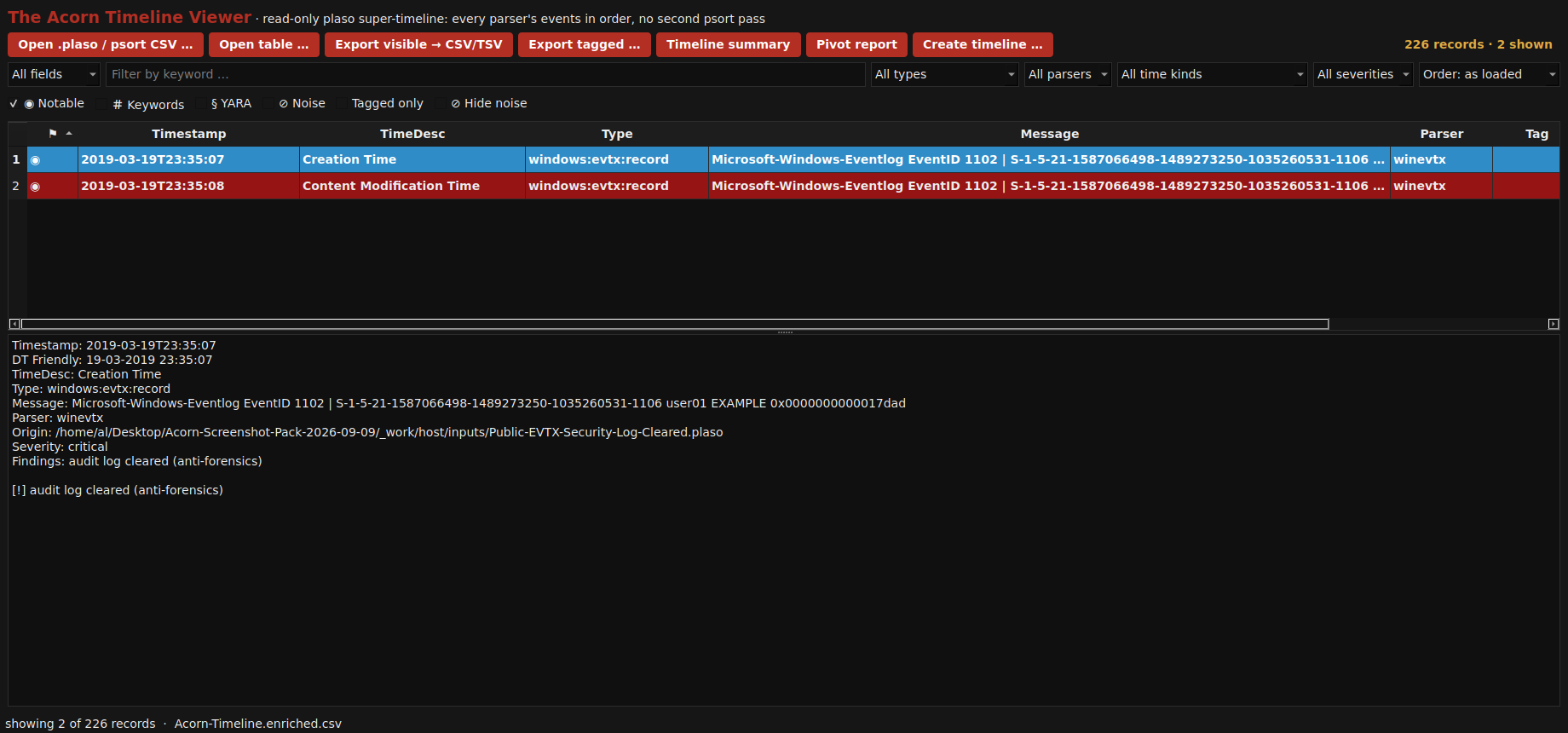 View full screen
Enlarge the screenshot to read the source records.
Examination steps
Steps to review in your evaluation
-
Define the period and question before filtering the timeline. Record the time basis used for the comparison and any uncertainty in the source clock.
-
Inspect the selected rows and their underlying event details. Distinguish alternate timestamp representations from separate proven actions.
-
Correlate important points with other sources, and explain gaps or conflicting times. Keep the resulting narrative separate from the raw chronology.
Evaluate the workflow
Questions worth bringing to a demonstration
- Can I see which timestamp kind and source record support each selected timeline row?
- How will different time bases or an unknown source time zone be handled in my examination?
- Can another examiner reproduce the filtered sequence without inheriting my interpretation of it?
Related application guides
Start with your requirements
Request an application demo
Tell us the source type and task you want to examine. We can plan a demo using suitable training material. Do not send confidential evidence.