
The Acorn application guide
USN Journal Viewer
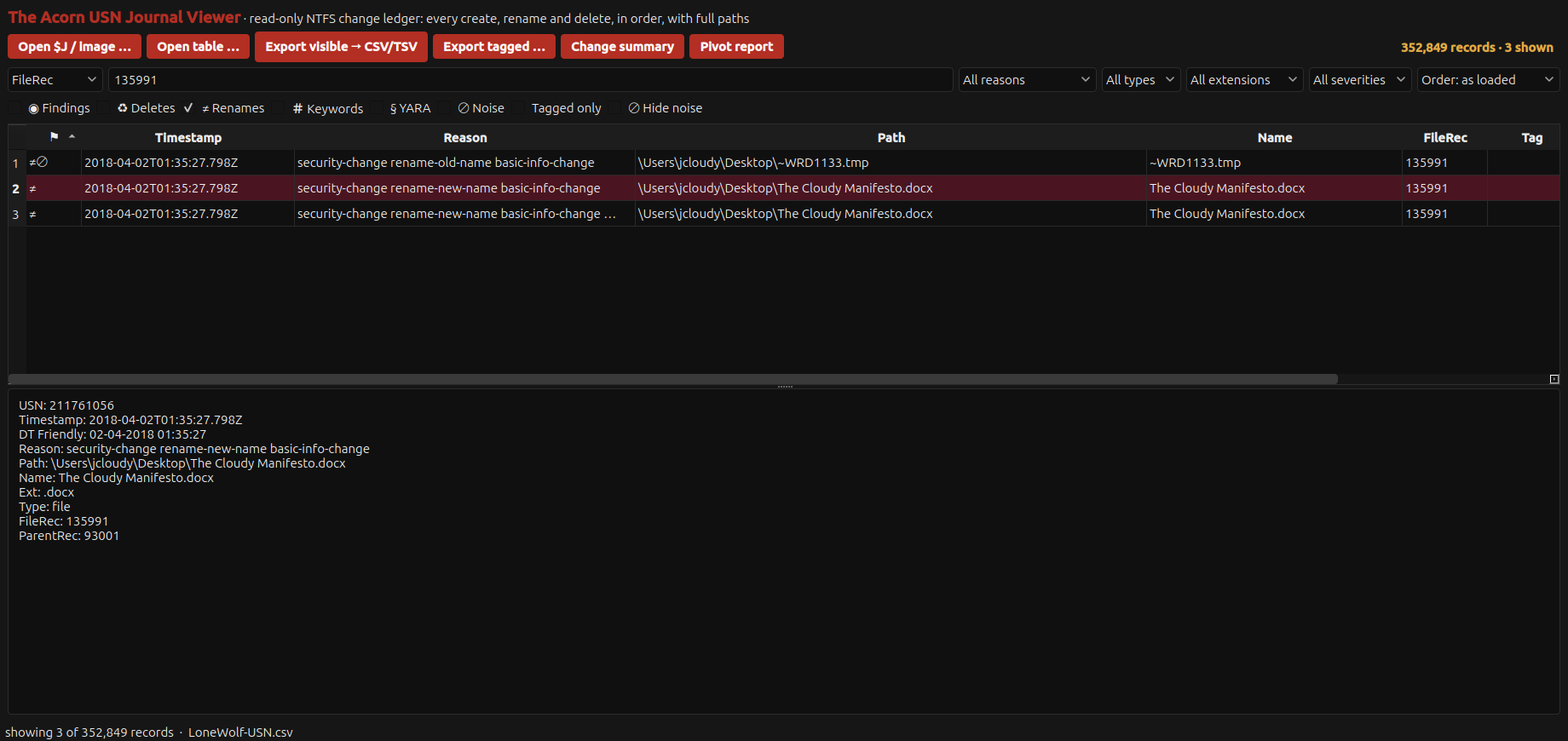
Three adjacent update sequence number (USN) journal records link a temporary filename to The Cloudy Manifesto.docx. They share file reference 135991. That link helps examine a save sequence, but it does not establish the document’s author or contents.
Public training example
Follow a temporary file through a rename sequence
Example input
- NTFS USN journal records from a public training source.
Result or controls shown
- Parsed change records retaining names, file references and recorded timestamps.
 View full screen
Enlarge the screenshot to read the source records.
Examination steps
Steps to review in your evaluation
-
Locate the relevant names or file references and retain the source journal context.
-
Compare adjacent changes, recorded times and references to test whether they describe the same file. Avoid joining unrelated records simply because their names resemble one another.
-
Compare the proposed sequence with the available file records and document evidence. Treat missing journal entries as a coverage question, not automatic proof that an action did not occur.
Evaluate the workflow
Questions worth bringing to a demonstration
- Can the demonstration connect the relevant changes by file reference as well as by name?
- What part of the proposed sequence is supported by these journal records, and what needs another source?
- Can a second examination of the same journal reproduce the selected records and their order?
Related application guides
Start with your requirements
Request an application demo
Tell us the source type and task you want to examine. We can plan a demo using suitable training material. Do not send confidential evidence.