
The Acorn application guide
Shortcut Viewer
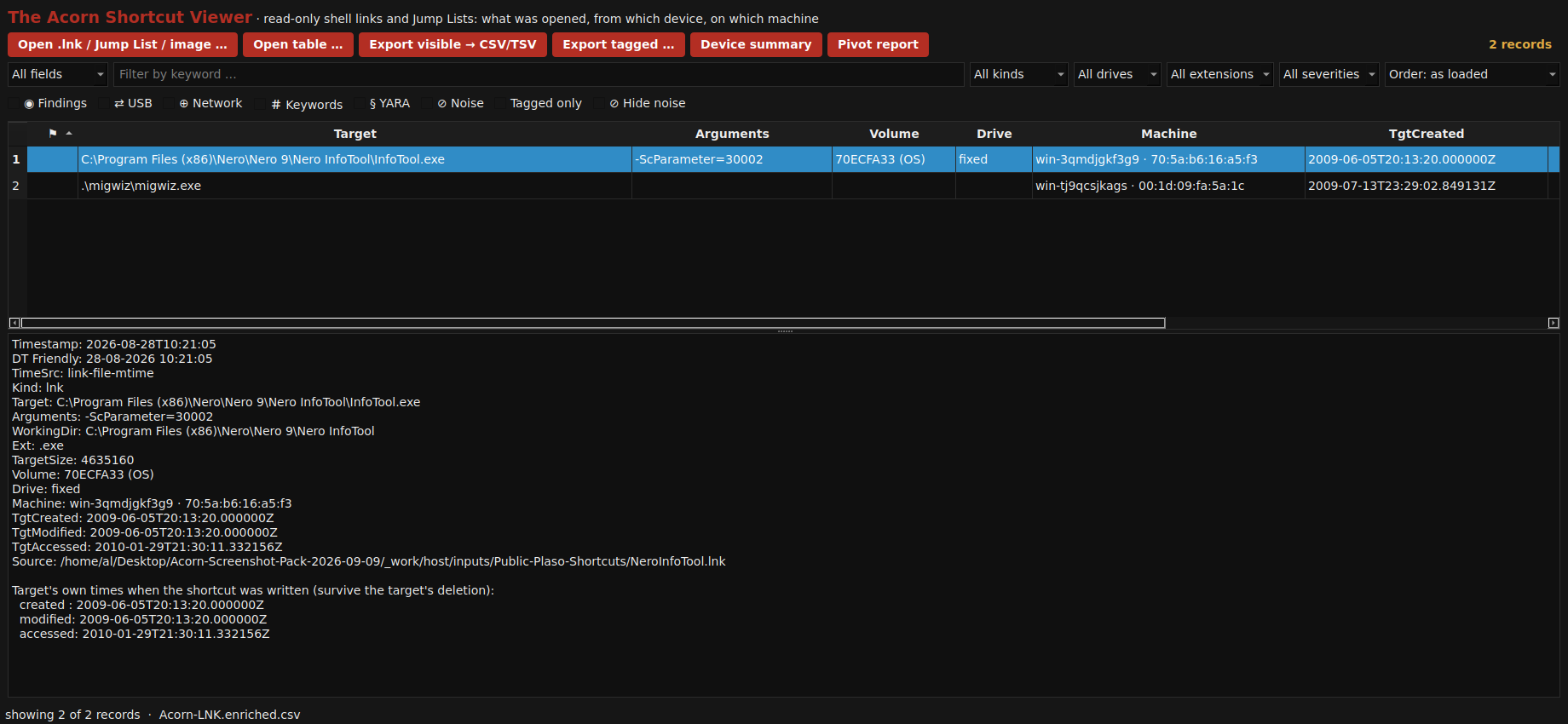
Two public shortcuts retain target paths, command arguments and authoring-machine details. The selected Nero link also stores a volume serial and target timestamps. Keep those embedded values separate from the shortcut file’s own timestamps.
Public training example
Separate a shortcut’s history from its target metadata
Example input
- Windows shortcut files from a public test collection.
Result or controls shown
- Parsed shortcut targets, arguments and available embedded device and timestamp information.
 View full screen
Enlarge the screenshot to read the source records.
Examination steps
Steps to review in your evaluation
-
Select the relevant shortcut and inspect its stored target, arguments and available device details.
-
Separate the shortcut file's current timestamps from the embedded target timestamps. Consider the effect of the collection or test-data copy on the former.
-
Compare a significant path or volume lead with other available file and activity records. Check material fields independently before relying on them in a finding.
Evaluate the workflow
Questions worth bringing to a demonstration
- Does the review clearly separate the shortcut's own timestamps from embedded target timestamps?
- Which stored fields link the shortcut to the target or volume being discussed?
- What additional evidence would be needed to move from a recorded target to a claim of execution or user activity?
Related application guides
Start with your requirements
Request an application demo
Tell us the source type and task you want to examine. We can plan a demo using suitable training material. Do not send confidential evidence.