
COMING SOON · Q1 2027 Planned releaseGet notified + 10% launch offer ↗
← Acorn overview

Acorn application guide

Plist Viewer

Configuration is evidence of a setting, not proof that its action completed. Read a LaunchAgent's arguments and conditions together before making that distinction.

Demonstrated on constructed training data

What action does a property list configure, and under what conditions?

Start with

  • Constructed binary property lists, including a harmless LaunchAgent example.

What you can take away

  • Parsed property-list keys and values in a native review view.
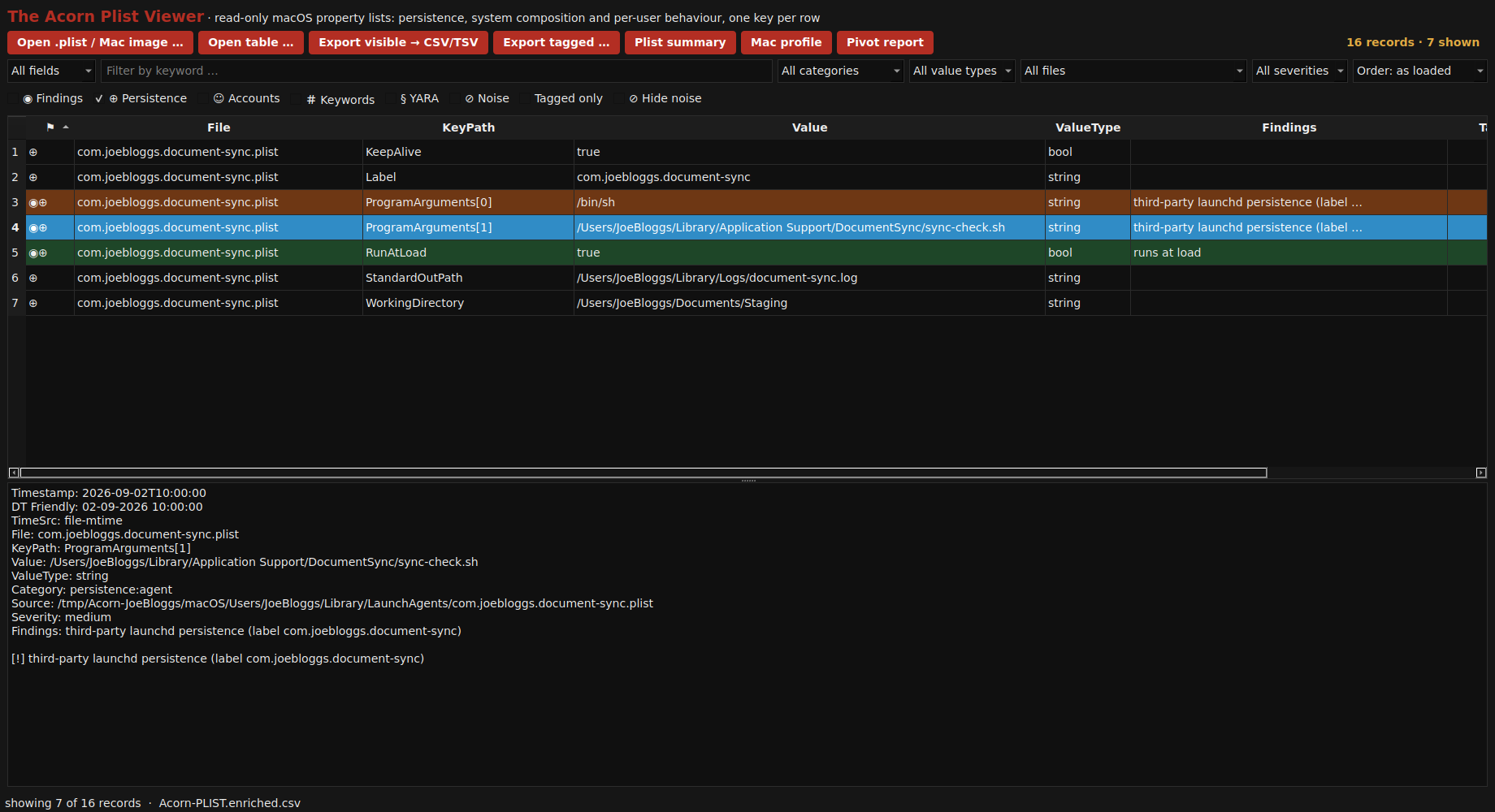
The native property-list parser expands a constructed LaunchAgent into individual keys: its label, program arguments, working folder and launch conditions can be reviewed together. View full screen
The native property-list parser expands a constructed LaunchAgent into individual keys: its label, program arguments, working folder and launch conditions can be reviewed together.

Open the screenshot and choose “View actual size” to read the records at their original resolution.

A practical starting point

How the workflow fits together.

  1. Open the property list and expand its keys.

  2. Inspect program arguments, working folder and launch conditions together.

  3. Check the referenced files and other activity before interpreting the configuration.

Start with your requirements

Bring a sample question.

Ask us to demonstrate this workflow with suitable public or constructed material. Do not send confidential evidence in an initial enquiry.

Planned for Q1 2027

Be first to hear. Save 10% at launch.

Request Acorn launch news and details of the planned 10% offer. No deposit or purchase commitment.

Notify me at launch ↗

Launch-update requests go to the SQFR team for review. Final offer terms and product availability are still to be confirmed.

About the screenshots and illustrations

Application screens are selected from the September 2026 Acorn screenshot pack. Captions distinguish native setup views, constructed training records and public-corpus results. They are not private client cases, and a displayed control does not establish that every operation was completed.

Relevant public sources include DeepBlueCLI training event logs and Plaso test data. Check the relevant source terms before redistributing an underlying dataset.

Workspace scenes and sector mascot variants are generated illustrations. They do not show actual police, judicial, military or university deployments or endorsements. The original Squirrel Forensics identity is retained.

Zoom in, then scroll to inspect the detail.

Open full-resolution image ↗

A useful first conversation

Let’s look at your workflow.

Tell us what you examine, where you work and what you need to deliver.

Use the enquiry form to outline your role, intended use and potential order quantity. Do not send case material through a general enquiry.

Your enquiry goes to the SQFR team. Please do not include passwords or case evidence.