
← The Acorn overview
The Acorn application guide
Network Workbench
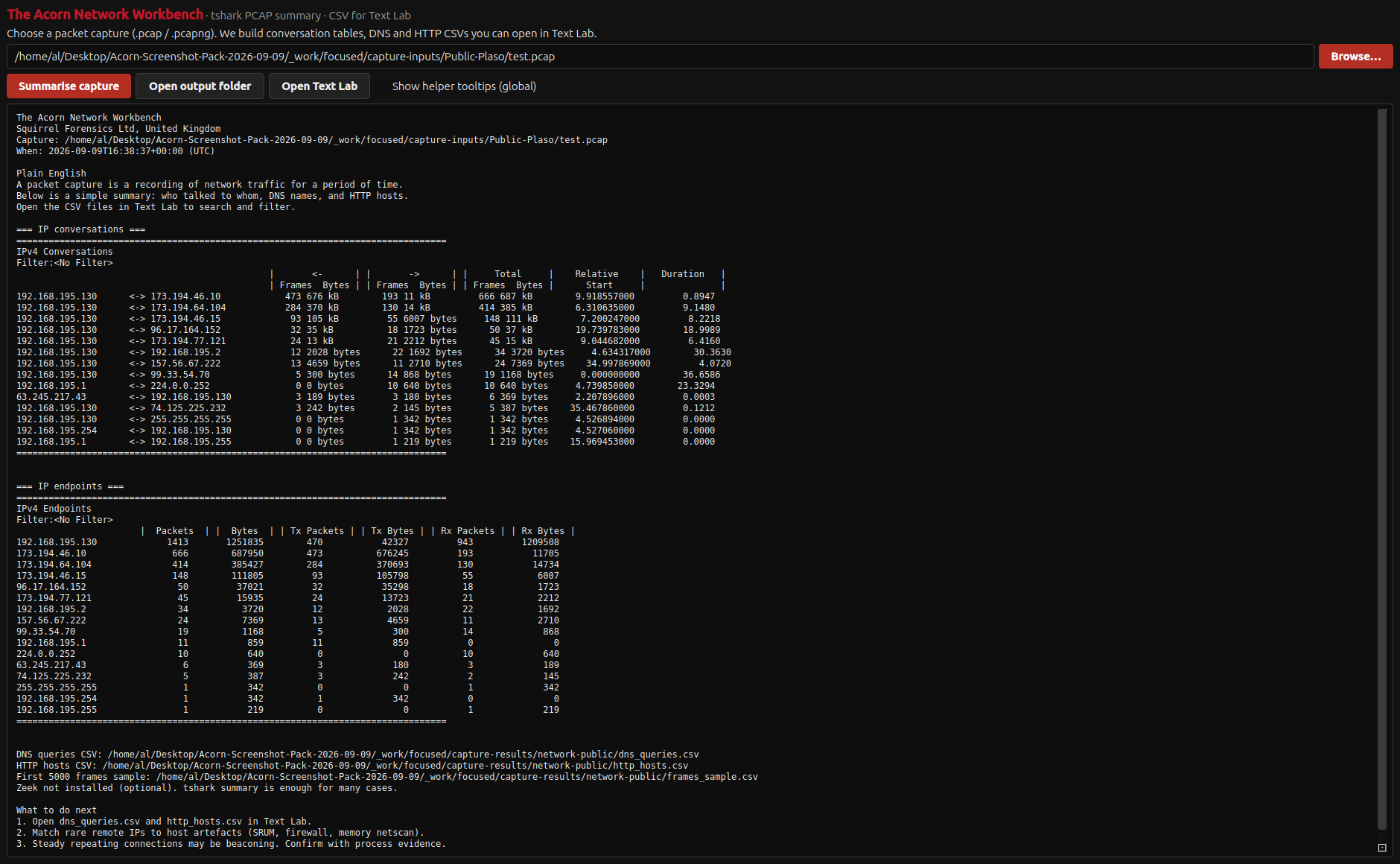
A public capture from July 2013 contains 1,434 packets, 14 IPv4 conversations and 16 endpoints. Review its network summary, then inspect the DNS and HTTP records. The example is historical traffic, not a live interception.
Public training example
Inspect conversations in a saved packet capture
Example input
- A public historical packet capture; PCAP and a converted PCAPNG were processed in the recorded checks.
Result or controls shown
- Endpoint and conversation tables with demonstrated DNS and HTTP CSV output paths.
 View full screen
Enlarge the screenshot to read the source records.
Examination steps
Steps to review in your evaluation
-
Open the capture and review its basic processing coverage.
-
Inspect endpoints, conversations and related protocol summaries.
-
Use those summaries to choose packets or activity for a more detailed examination.
Related application guides
Start with your requirements
Request an application demo
Tell us the source type and task you want to examine. We can plan a demo using suitable training material. Do not send confidential evidence.