
Turn the module into practical requirements
List the tasks students must perform: imaging, read-only mounting, file-system review, browser interpretation, event-log analysis or reporting. Identify the inputs, expected outputs and prerequisite knowledge for each exercise.
Decide whether students work individually, in pairs or through a shared demonstrator. That affects hardware quantity, storage, supervision and the amount of equipment handling. A single high-specification demonstration machine is not automatically the right answer for a whole cohort.
 View full size
Use datasets with known answers and useful uncertainty
Give each group the same starting image and record its hash. Keep a tutor answer key and a documented build. Students should learn to distinguish a source record from an interpretation, including cases where the available records do not answer the question.
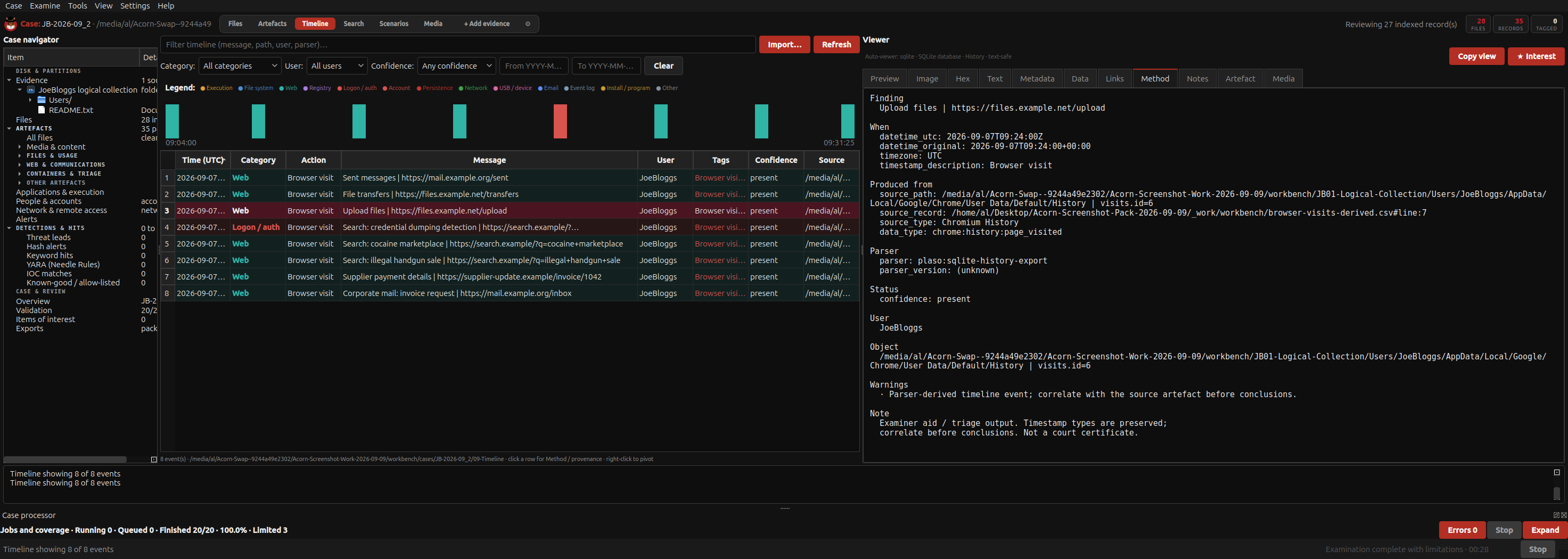
The existing Acorn teaching example compares a browser visit with a separate upload event. It is useful because the extra evidence changes the conclusion. Similar exercises can assess time-zone handling, source references and the ability to reproduce another group’s result.
Evaluate the whole teaching arrangement
Check display readability, accessibility needs, reset time, working storage and technical support. Confirm how updates will be managed across the teaching term and how student outputs remain separate from master datasets.
Ask SQFR for a requirements-led discussion covering cohort size, modules, existing screens and PCs, delivery timetable and support expectations. Academic supply is bespoke; this page does not promise an automatic discount, accreditation or a qualification.
What to check
- Learning outcomes linked to actual tools and inputs
- Known datasets, tutor answers and repeatable builds
- Cohort, storage, accessibility and support requirements documented
Common questions
Can you quote for an institution’s specific requirements?
Yes. Provide the modules, class size, proposed use and existing facilities so SQFR can discuss a suitable configuration and scope.
Does buying the workstation include a course or accreditation?
Do not assume so. Training materials, instruction, support and any course delivery must be specified separately in the agreement.
Explore the relevant Acorn apps
Put the workflow to the test
Discuss your institution’s forensic teaching requirements
Tell SQFR about the source types, task and equipment you need. We can discuss a focused demonstration and the configuration or quotation that fits. Do not send case evidence or credentials through the enquiry form.